


Local Weather:Weather Forecast
4.815.55K Reviews
App Specs
- Version
- 1.9.2
- Updated On
- License
- Free
- Downloads
- 10,000,000+
- Developer
- Enjoy Life Studio
- Categories
- Weather
- Platform
- Android, iOS
Screenshots
 Analysis by AppCompare
When I check the weather, I usually need one practical answer: what should I expect where I am, and does that change my plans? Local Weather: Weather Forecast is built around that everyday decision. It is a weather app from Enjoy Life Studio, and its appeal is the combination of a quick current-conditions view with forecasts I can consult before heading out. I see it as a useful daily companion rather than a specialist tool for serious storm tracking or long-range planning.
What a quick check can—and cannot—tell you
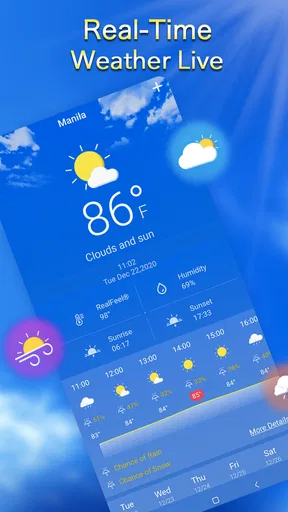
The main benefit of a local forecast is convenience: I can look at the weather before choosing a jacket, leaving for work, or deciding whether to take a walk. This app presents the basics in an approachable way, so I do not have to dig through a complicated dashboard for a first impression. That makes it especially suitable for people who check the weather briefly several times a day rather than studying charts.
There is a useful distinction between a quick snapshot and a decision-grade forecast. A temperature reading can help me dress, while wind and humidity add context that a single number misses. But for plans that depend on precise timing—an outdoor event, a long drive, or a hike—I would treat any phone forecast as guidance, not a guarantee. Conditions can shift, and the sensible move is to check again before committing.
Speed expectations in everyday use
I expect a weather app to be ready when I open it, because the point is often to make a decision in seconds. The straightforward layout here supports that habit: current conditions are easy to scan, and the hourly forecast gives me a reason to stay for a closer look when timing matters. I would not confuse a clean presentation with proof that every forecast refreshes instantly, though. Network quality and the freshness of weather information can affect what appears, so I check the displayed conditions against the sky when the stakes are higher.
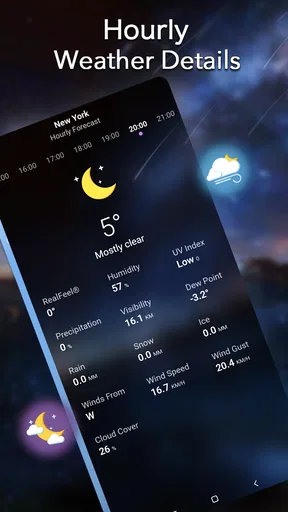
A practical trick is to use the hourly view for the next part of the day rather than treating the headline temperature as the whole story. If I am deciding whether to run an errand on foot, the expected change later may matter more than the conditions at the moment I open the app. For packing, the weekly outlook is more helpful as a broad planning aid than as a promise about a particular hour several days away.
Heavy-use moments and useful habits
The app makes most sense when weather checks are tied to a routine: before a commute, while getting ready for an outing, or when deciding whether to bring an extra layer. I would check the hourly forecast before a school pickup or a walk that cannot easily be postponed, then take another look close to departure if rain would cause a real problem. That small habit is more useful than repeatedly refreshing without a specific question in mind.
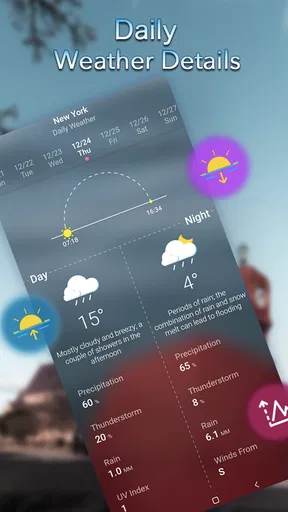
For a weekend away, I would use the weekly forecast to sketch out what clothes and equipment to bring, then revisit it nearer the trip. That reduces the temptation to overpack based on a forecast that may change. If I am camping, I would also keep a backup plan and pay attention to local conditions; an app notification is helpful, but it should not be the only safety check for a remote or exposed location.
Worth Reading Before You Choose

Flipboard Shows What News Apps Must Do Beyond the Feed

Switching to Android Auto Means Rethinking Your Driving Routine

Google Calendar Makes a Crowded Week Easier to Manage

Ludo King Makes the Most of the Minutes Between Plans

Baby Panda World Brings Quick Play to Modern Phones, but Its Game Library Feels Busy

ESPN’s Live Game View Makes Following Close Games Easier
Reliability, alerts, and judgment
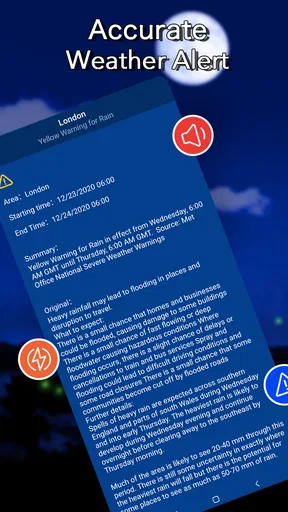
Weather alerts can be valuable because they may draw attention to a change I would otherwise miss. I like the idea of having a warning arrive while I am focused on something else, but I would not assume that every alert will arrive at the exact moment I need it or replace official local warnings. For severe weather, I would compare what the app shows with trusted public safety guidance and act conservatively.
There is also a practical trade-off with notifications: more alerts can mean more interruptions. I would keep them enabled only if they help me make decisions, and review the app’s notification settings if they become distracting. If I rely on an alert for an outdoor activity, I would open the app before leaving rather than assuming my phone will surface every relevant change in time.
Device demands and fit
Local Weather: Weather Forecast is free to download, with optional in-app purchases priced from $0.99 to $4.99 per item. It is rated for Everyone, has a 4.8 average from around 565,000 ratings, and has been installed over 10 million times. It was released on December 8, 2020, and version 1.9.2 requires Android 6.0 or later. Those details make it a broadly accessible option for many Android users, though an older device may still feel different from a newer one in day-to-day use.
I would not expect a basic weather check to demand the same attention as a resource-heavy game, but I also would not make claims about battery use or background activity without testing them on a particular phone. If you are trying to stretch battery life, opening the app only when needed and keeping notifications limited are sensible habits for any weather tool. The free starting point is appealing, while the optional purchases mean it is worth checking what is included before paying; the core decision is whether the available forecast view suits your routine.
Who will appreciate it, and who may want another tool
I think this app is best for someone who wants a readable local forecast without turning a simple question into a research session. A commuter can check conditions before leaving; a parent can plan a walk around the expected weather; and a casual traveler can use the weekly view to make a first packing list. Its strongest role is everyday preparation, where a quick glance and an hourly check are usually enough.
If you are a weather hobbyist who wants advanced radar layers, detailed maps, or specialist analysis, a dedicated forecasting service may be a better fit. I would also look elsewhere if you need a specific accessibility option or a particular display style that the app does not provide for your needs. Compared with a phone’s built-in weather widget, a dedicated app can be more useful when I want to move beyond a single glance and inspect hourly or weekly changes. The built-in option may still win when speed and minimal setup matter most.
One everyday example: before leaving for a morning appointment, I would check current conditions to choose a coat, scan the hourly outlook for the return trip, and decide whether carrying an umbrella is worth the space. If the forecast suggests a change later, I would make the plan more flexible instead of treating that forecast as certain. That is a modest workflow, but it turns the app into a practical planning aid rather than a number I glance at and forget.
For a first-time user, I would start by setting the temperature and wind units that feel familiar, then learn where the current reading and hourly outlook sit before relying on the app in a rush. It is also worth opening the weekly forecast when planning ahead, rather than using today’s conditions as a shortcut for the whole week. These small choices reduce friction and help make each check answer a clear question.
First Impressions
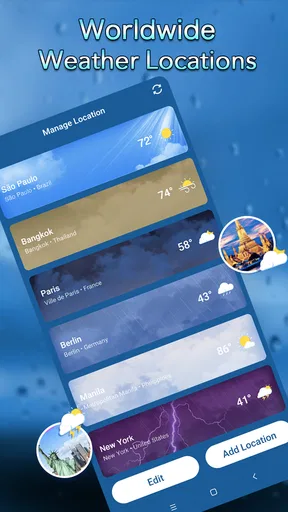
So, let’s talk about the first thing that hits you when you open the app: the interface. Local Weather: Weather Forecast greets you with a clean and intuitive design. No clutter, just the essentials. The home screen offers a quick glance at the current weather conditions, and let me tell you, it’s as straightforward as it gets. You’ve got your temperature, humidity, and wind speed right there, all wrapped up in a visually pleasing package.
Features Galore
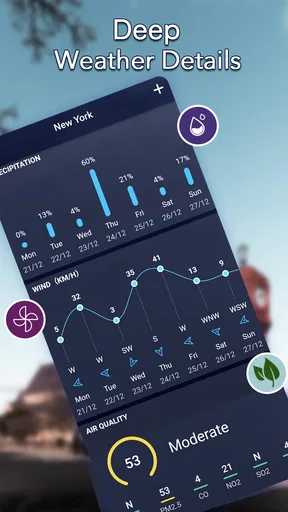
One of the things I absolutely love is the detailed hourly and weekly forecasts. It’s like having a personal meteorologist in your pocket. The app gives you a breakdown of what to expect throughout the day – so no more guesswork! And if you’re planning a weekend getaway, the weekly forecast has got your back, helping you pack just right.
Another cool feature is the weather alerts. These timely notifications ensure you’re never caught off guard by sudden storms or unexpected weather changes. I found this particularly handy during a recent camping trip. It’s like the app had my back, nudging me to pack that extra raincoat.
Customizable Experience
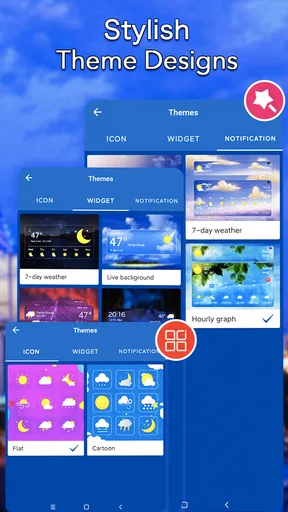
Customization is key with any app, and this one doesn’t disappoint. You can tailor the settings to match your preferences. Prefer Celsius over Fahrenheit? No problem. Want to switch the wind speed from mph to km/h? Easy peasy. The app makes it simple to adjust everything to your liking, ensuring a personalized experience.
Performance and Usability
Now, let’s talk performance. The app runs smoothly, with no noticeable lag or crashes. It’s quick to load and updates the weather data promptly, which is crucial for staying informed. Even when I was in a low-reception area, the app managed to pull through with updated info. Kudos to the developers for optimizing it so well!
Usability is top-notch, making it a breeze even for those who aren’t tech-savvy. The navigation is straightforward, with everything accessible within a few taps. Whether you’re a weather enthusiast or just someone who wants to avoid getting drenched, this app makes it easy.
Final Thoughts
So, would I recommend Local Weather: Weather Forecast? Absolutely. Whether you’re planning a picnic, a road trip, or just your daily commute, it’s a reliable companion that keeps you prepared. It’s like having a trusty friend who’s always got the scoop on what the sky’s up to. So, go ahead, give it a shot, and never be caught off guard by the weather again!
Pros
- Accurate real-time weather updates.
- Comprehensive forecast details.
- User-friendly interface.
- Customizable alert settings.
- Minimal battery usage.
Cons
- Ads can be intrusive.
- Limited offline functionality.
- Some features require premium.
- Occasional loading delays.
- Not all regions covered.
FAQs for Local Weather:Weather Forecast
What features does Local Weather: Weather Forecast offer?
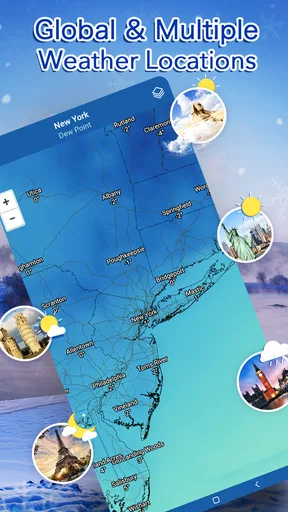
Local Weather: Weather Forecast provides real-time weather updates, including temperature, humidity, wind speed, and precipitation forecasts. It also offers a 7-day forecast, severe weather alerts, and radar maps. Users can customize notifications and choose between different units of measurement. The app is designed to be user-friendly with a sleek interface.
Is the app free to use, or are there in-app purchases?
Local Weather: Weather Forecast is available for free download, offering basic features without any charge. However, it includes in-app purchases for premium features, such as ad-free usage, extended forecasts, and advanced radar options. Users can decide whether the enhanced functionality is worth the additional cost.
How accurate is the weather information provided by the app?
The app sources its data from reliable meteorological institutions and uses advanced algorithms to provide precise and up-to-date weather information. While no weather app can guarantee 100% accuracy due to the unpredictable nature of weather, user reviews generally praise the app for its reliability and consistency.
Does the app work offline or require an internet connection?
Local Weather: Weather Forecast requires an internet connection to update its weather data and provide accurate forecasts. However, once the data is downloaded, users can access the last updated information offline. For real-time updates and alerts, a stable internet connection is necessary.
How does the app handle user privacy and data security?
User privacy is taken seriously by Local Weather: Weather Forecast. The app requests minimal permissions, primarily for location services to provide accurate local forecasts. It adheres to strict data protection standards and does not share personal information with third parties without user consent, ensuring a secure user experience.


